Simcenter FLOEFD

Simcenter FLOEFD is an award-winning CAD-embedded CFD simulation tool for easy, fast, robust and accurate fluid flow and heat transfer analysis.


It helps shorten development by up to 65-75% compared to typical CFD approaches by frontloading fluid flow simulation and thermal analysis and using native CAD geometry.

Request an evaluation
  • CAD-embedded CFD simulation
  • Automated meshing
  • Parametric studies
  • LED thermal simulation
  • Electronics thermal and thermo-mechanical analysis in CAD

Why Simcenter FLOEFD?

Frontload CFD simulation to shorten development
Simcenter FLOEFD enables design engineers to perform simulation earlier in the design process when it is more cost-effective to identify and fix problems or explore improvements. Integrated in CAD, it has shown improved productivity by a factor of x2 to x40.

Leverage an intuitive CFD interface for designers
Put simulation in the hands of design engineers with the Simcenter FLOEFD CAD embedded interface, guided simulation set up and execution, intelligent automation technologies and straight forward viewing of results. Allow them to explore design performance earlier so they can make informed decisions without having to overcome traditional barriers.

Perform CFD directly on native CAD geometry and eliminate CFD overheads
Eliminate delays in geometry translation between tools and overcome complexity in preparing CAD geometry for CFD analysis. Simcenter FLOEFD uses native geometry directly: so as you explore performance or evaluate changes to a model, the CAD model is being changed concurrently.

It has key strengths in robust automatic meshing and unique SmartCell technology that enables handling of CAD geometry of any quality. These strengths help to handle small narrow gaps in assemblies and surface inconsistencies, which often cause long delays for healing in traditional CFD tools. This is complemented by intelligent automation for pre-processing, such as automatic sealing of CAD geometry and leak identification.

Use simulation driven design – explore, compare and optimize
Leverage parametric studies and design exploration functionality to evaluate more design options within the time available. Evaluate 'what if' scenarios to ensure product performance and reliability in different conditions. 

Using this software, you can easily compare designs using side-by-side with CFD result visualizations, plots and tabular results and generating reports in just a few clicks. When your design is optimized using simulation, you can directly communicate the CAD model to other engineering functions.
Simcenter FLOEFD capabilities

  • CAD-embedded CFD simulation

    Our CAD-embedded CFD simulation software enables engineers to conduct fluid flow simulation and heat transfer analysis in the CAD design environment. It has an intuitive interface, and critically, uses CAD geometry directly. This eliminates the time overhead of CAD data translation. It also allows engineers to conduct multiple design studies and evaluate results to see how modifications to geometry or operating boundary conditions influence performance. This makes simulation results available earlier in development for better decision making, and it supports more seamless communication with other CAD-driven engineering functions.


  • Automated meshing

    The Simcenter FLOEFD automatic fluid volume detection and automated meshing techniques are designed to work directly with CAD geometry. It can handle complex or variable quality geometry without the need to simplify models. SmartCells Technology is at the core of efficient automatic meshing with the Simcenter FLOEFD robust cartesian immersed boundary grid method. SmartCells can resolve many solid and fluid regions accurately within a single cell, subdividing it into multiple control volumes for calculation. This is crucial to meshing complex CAD models, including automatically dealing with challenging conditions like interfering geometry or very thin volumes.  Simcenter FLOEFD applies automatic mesh refinement based on geometry features, and solution adaptive refinement can be enabled for efficient mesh resolution of regions with higher flow and thermal gradients. There are options available for local meshing and manual controls for engineers desiring more precise control of the mesh.    

    Simcenter FLOEFD meshing and solver technology provides a unique combination of classic 3D finite-volume numerical approaches with empirical and analytical methods to simulate CFD problems. A comparatively coarse mesh can be generated quickly and easily, which is very efficient and stable to solve compared to typical CFD software, while still maintaining relatively high accuracy. 

    A step change of going from days to hours, or hours to minutes for meshing is often reported when Simcenter FLOEFD is adopted. The innovative meshing technology of our CAD-embedded approach allows design engineers and non-specialists to reliably conduct CFD analyses early in the design process. It also provides a fast and efficient alternative approach for experienced analysts to tackle a wide range of typical CFD problems.

  • Parametric studies

    Simcenter FLOEFD incorporates a very capable and intuitive parametric study functionality. Use it to explore changes in model geometry or different operating scenarios through to design of experiments studies.

    The compare configuration combined with the parametric study capabilities inside Simcenter FLOEFD enables engineers to more easily understand the influence of changes in the geometry and boundary conditions on the performance. Users can compare results by numerical values, graphs and visualized results and plots.

    The three primary methods for design exploration include:

    • 'What if' studies using a series of altered parameters to explore resultant designs using the compare tool to find the best solution yourself
    • Goal-based optimization uses a range of variation for a single input variable to find the best design
    • Design of Experiments (DOE) allows you to set a range of variation for a number of design variables and then solve a matrix of design points. You can then find the optimum design using the Response Surface interpolation method

    Additionally, there is a Simcenter HEEDS plugin available which further enables engineers to perform design space exploration by using smart and efficient search and automation, and by leveraging the underlying proprietary Sherpa Algorithm. Simcenter HEEDS helps engineers to find design concepts that meet or exceed performance requirements quicker than traditional optimization approaches.


  • LED thermal simulation

    LED thermal management is important for ensuring correct lighting performance and for reliability. The Simcenter FLOEFD CAD-embedded CFD software enables lighting product design engineers to explore luminaire thermal designs early on and throughout development to avoid re-spins. 

    Specific capabilities in the Simcenter FLOEFD LED module include combined thermal-electrical and photometric modeling of LEDs, and the ability to import your own LED models. You can model the LED component thermal behavior in detail to predict accurate LED junction temperature when powered under a forward current and the resulting operating light output (hot lumens) for the LED installed in a luminaire.  

    Uniquely, Simcenter FLOEFD simulation can be combined with: measurement data for an RC-ladder compact thermal model from Simcenter Micred T3STER; and optical characterization data from Simcenter Micred LED Tester to provide the highest accuracy test data-based LED model for use in system level studies.

    The LED module supports Monte Carlo radiation modeling for simulating absorption and scattering of radiation in semi-transparent solids such as glass, as well as considering the effects of refraction and specular reflection to wavelength dependency. For automotive lighting and other demanding applications, condensation modeling enables engineers to model the complexity of thin film condensation, evaporation, the influences of icing and water absorption for changes in humidity.

  • Electronics thermal and thermo-mechanical analysis in CAD

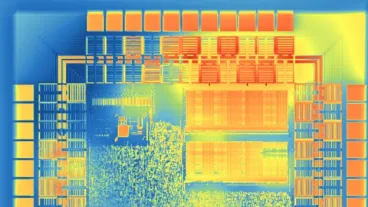
    Simcenter FLOEFD enables thermal engineers and designers to work in the CAD environment to accelerate thermal design – for electronics cooling simulation to thermo-mechanical stress analysis.

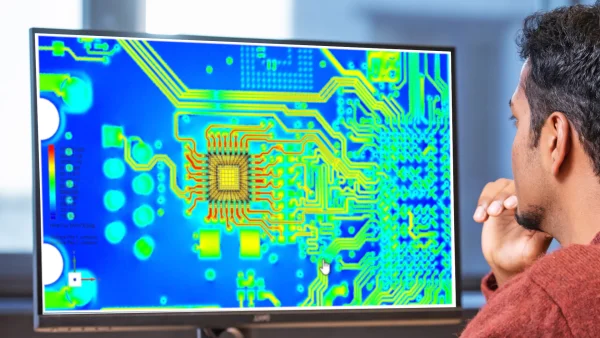
    Highlighted features include design stage appropriate options for thermal analysis of printed circuit boards (PCBs) from simple, detailed (layered) to explicit copper trace. The SmartPCB option, a computationally efficient modeling network assembly approach, does not sacrifice accuracy for thermal modeling that also supports electro-thermal co-simulation tasks and thermo-mechanical stress analysis. The Simcenter FLOEFD EDA Bridge supports easy PCB data import from all major EDA software file formats. Package modeling options including 2-Resistor, network assembly, and detailed models. It is possible to create these with all internal geometric elements included, in just minutes using the Package Creator utility.

    Further capabilities include transient modeling and measurement calibration (with Simcenter Micred T3STER) to achieve the highest accuracy. Additionally, BCI-ROM technology enables you to generate reduced order models from 3D analysis for use in electrothermal circuit simulation and system simulation tools.

    Learn about streamlining PCB thermal and thermo-mechanical analysis in this on-demand webinar.

What's new in Simcenter FLOEFD 2606?

The new Simcenter FLOEFD 2606 software release is now available in all its CAD-embedded CFD variants, and also the Simcenter 3D embedded variant. This release delivers focused improvements for electronics cooling analysis.

This includes library enhancements for easy validated component re-use, efficient modeling of power sources on a die to identify hotspots for IC packages in system models, improvements to computationally efficient PCB thermal modeling, automation of EDA data import, and much more.

This release delivers focused improvements for fast sealing of geometry for internal flow analyses for all general purpose CFD applicationstrough to multiple enhancements for electronics thermal analysys workflows.

read blog
 Simcenter FLOEFD software release - InnoFour Experts

Find out how others are successfully using Simcenter FLOEFD

Simcenter FLOEFD in combination with Creo

"The usage of Simcenter FLOEFD in combination with Creo has halved the lead time of the design process and ensured that one third less was spent on building physical prototypes."

Wouter Leus, Advanced R&D Expert Xeikon

Reduce development time with Simcenter FLOEFD

"With Simcenter FLOEFD the development time can be reduced up to 29%. I can see the result from a wood stove simulation in a section that makes it easy to understand how the air moves through the combustion process."

Morten Seljeskog, Sintef Energi

Cut costs and time by eliminating local testing.

"Simcenter FLOEFD CFD software allowed us to cut costs and time by eliminating local testing and running simulations overnight. Our flotation units now perform more efficiently and by keeping the process in-house, we retained valuable knowledge for rapid future improvement."

Bernold Leferink, Marel

Predict transition to turbulence in flat plate channel flow.

"I appreciate the straightforward and fast simulations with Simcenter FLOEFD. We at APEX-Research successfully used Simcenter FLOEFD for many years and now we have increased confidence in its results through our own modeling experiment."

Dr.-ING. Jens Kitzhofer, APEX-Research B.V.

Request an Evaluation

Fields with * are required